

» Home Electrical Wiring
» Electrical Wiring Directory
» Residential Home Wiring Diagrams
» Need Electrical Help? Ask the Electrician
» Residential Home Wiring Diagrams
» Need Electrical Help? Ask the Electrician
Surround Sound Connections
 |
By Dave Rongey
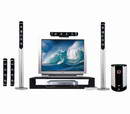
Summary: If you have a stereo receiver or amplifier then chances are you can connect your other audio devices so the sound is played over the stereo speakers. © By: Dave Rongey |
How to Connect TV, DVD, iPod, Wii for Stereo Surround Sound
Stereo Surround Sound Components
Audio Input Device
Stereo System
Big Screen TV
High-Definition Flat Panel Display
Audio Video Receiver
Audio Output Devices
DVD Player
VCR Player
Satellite / Digital Cable Receiver
Surround Sound Speaker System
MP3 / iPod Interface
Wii / Game Device
Computer or Laptop
The Secret to Quality Surround Sound Through Your Stereo From Almost Any Device |
|
|
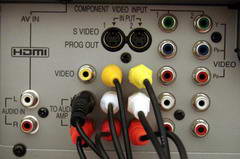
Quick Terminology: RCA Jacks - These are the round jacks as seen at the right, the audio jacks are typically Red and White. Required: Audio Input Jacks Your stereo or big screen tv will need to have Audio Input or Aux Input jacks, one for the right speaker and one for the left speaker. Required: Audio Input Jacks The device you would like to hear through your TV or Stereo will need to have: Audio Output jacks, one for the right speaker, one for the left speaker. You could even use the Earphone Jack as the output jack as well, but you will need to get an adapter to go from the headphone jack to the RCA jacks. |
 Compatibility Issues: Make sure that the Ohms of all of the audio devices are the same. Audio systems are typically 4 ohms or 8 ohms. Also be aware not to over drive the amount of watts that will be configured for the whole system to avoid damaging speakers or components. |
Several Possible Devices Just Waiting to be Heard |
|
I have used the above method to connect several devices through my stereo receiver. Connecting our DVD player through the stereo sounded so good, I decided to add two more speakers, and that made it sound even better. One of the best discoveries was when I connected a old laptop computer to the stereo so I could listen to one of my favorite radio stations which I normally could not receive because it is in another state. All I had to do was find the radio station on the internet and select the live stream and I was connected. I simply placed the laptop near the stereo and made the connection using the earphone jack as the output and used an adapter to create the RCA jacks for the Input to the stereo. What to Do About Multiple Input Devices If you find that you have several new inputs that you wish to listen to then you will need to purchase a multi-selection audio input box from a store such as radio shack. |